Get Assembly
Creates an Assembly Order object that defines a subset of an assembly, which can be passed to other statements to perform statement-specific actions to the selected Assembly Steps. All Assembly Steps are owned by an Assembly Product Type, so an Assembly Order always specifies a single Assembly Product Type as well.
AssemblyDataSource Assembly Product Type:
The Assembly Order, including the Assembly Product Type and Assembly Step selection, can stay the same through the simulation run and be reused. The Assembly Steps can be freely selected from the chosen Assembly Product Type.
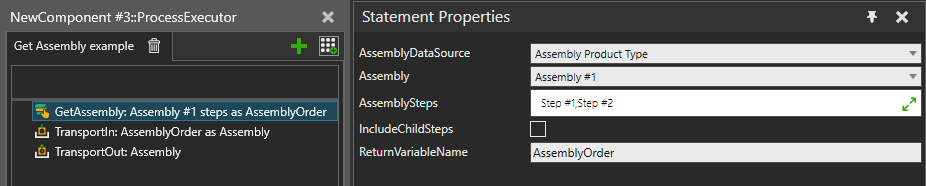
Figure 1. An example Process where Assembly Steps are selected into an Assembly Order, a new Assembly Instance is created and the selected Assembly Steps filled by a TransportIn statement. Finally, the created Assembly Instance is transported out to its next Process.
AssemblyDataSource Assembly Instance:
This mode should be chosen if a process needs to handle changing types of Assembly Instances or if the Assembly Instances have different states of completion when they arrive. The mode allows a generic selection of a single Assembly Step using few different rules. Use this mode, for example, to fully assemble or disassemble any Assembly Instance by using a loop or to make a generic Process implementation that advances the work on the Assembly Instance by one step and then passes it forward.
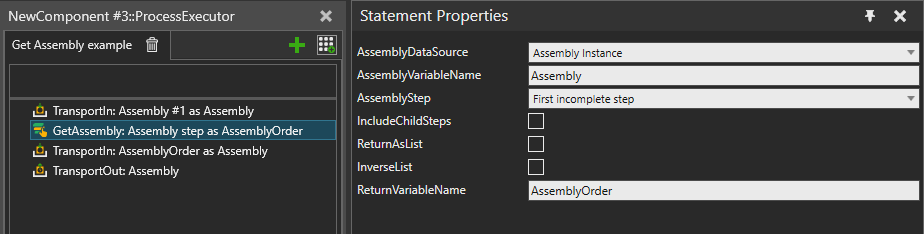
Figure 2. An example Process where an Assembly Instance is transported in, the next incomplete Assembly Step retrieved from it, then that Assembly Step is filled by TransportIn. Finally, the Assembly Instance is transported out to its next Process.
| Name | Description |
| IsEnabled | Turns on/off the execution of this statement. |
|
AssemblyDataSource |
Input mode defining which properties should be used for generating the output. |
|
AssemblyVariableName |
Name of the Process variable where to get the Assembly Instance. |
|
AssemblyStep |
Selection mode defining which step should be selected from the Assembly Instance. |
|
Assembly |
Assembly Product Type to use as data source and to select the Assembly Steps from. |
|
AssemblySteps |
Assembly steps to include as “selected” in the Assembly Order. |
|
IncludeChildSteps |
Whether all descendant steps of the selected Assembly Steps should be also included. |
|
ReturnAsList |
When True, the statement outputs a list of Product Instance references instead of creating an Assembly Order. This output can be used to inspect or manipulate Product Instances that are in an assembly without taking them out first. The list is created in the correct assembling order of the Assembly Product Type. |
|
InverseList |
Defines whether the Product Instance list should be output in reversed order, which is the disassembling order of the Assembly Product Type. Applicable only when ReturnAsList is set to True. |
|
ReturnVariableName |
Name of the Process variable to use for storing the result. The type of the variable will be either an Assembly Order or a list of Product Instances depending on the ReturnAsList selection. |